Best 2 Know

The Ultimate Blogging Resource

  • Advertising
  • WebHosting
  • Contact Us
  • Blogger
    • Blogger Templates
    • Blogger Tutorials
  • Browser
    • Firefox
    • Google Chrome
  • Google
  • Internet
    • Facebook
    • Twitter
  • Thesis
  • Windows
  • WordPress
    • WordPress Themes
    • WordPress Plugins
  • More
    • Linux
    • Review
    • Solutions
    • Announcements

Category: Browser

Mozilla Firefox 4 beta 1

Hello to you, do you know after the success of mozilla firefox 3 mozilla is developing its forth version and it has released Firefox 4 beta 1 . As all of you know Mozilla Firefox is considered the best browser in the world and Most of the Users of the Net Uses firefox so its got a demand.

Features :

  1. WebSockets

    Developers will be able to build real-time online interactions like gaming and chatting.

  2. Stylin’ Pages with CSS3

    With support for new CSS3 features, web designers can make their pages both look prettier and display faster.

  3. HTML5 Support

    A new HTML5 parser and full support for web video, audio, drag & drop, and file handling means Firefox 4 is ready to run the best web apps of both today and tomorrow.

  4. Web Console

    With this experimental analysis tool for modern sites, Firefox allows you to peek under the hood of dynamic web pages.

  5. JetPack SDK (Making Add-On Development Easier)

    Add-Ons can be installed without restarting the browser, and can be developed more easily using the new JetPack SDK and js-ctypes.

  6. Indexed DB

    Developers will be able to store application data locally, making cloud applications like Gmail or GDocs work more quickly and reliably, even when not connected to a network.

  7. Crash Protection

    Firefox provides uninterrupted browsing for Windows, Linux, and now Mac when there is a crash in the Adobe Flash, Apple Quicktime or Microsoft Silverlight plugins. If one of these commonly-used plugins crashes or freezes, it won’t affect the rest of Firefox. Instead, you can simply reload the page to restart the plugin and try again.

  8. New Add-Ons Manager

    An easier way to manage your add-ons and discover new options for personalizing your browsing.

  9. WebM and HD Video

    As pioneers of HTML5 video standards, Firefox also supports the WebM format so you can watch open HD quality video.

  10. Protecting Your Privacy

    Firefox puts your privacy first, fixing flaws in some web standards that allow bad guys to snoop around and expose your browser history.

So I think now you all are impressed and wanted to download it so Download it from here.

July 7, 2010 Ritesh Sanap Firefox

SkipScreen:Download From Rapid Share,Mega upload,Media Fire or Any Hosting SiteWith Out Waiting For Seconds (Download In Single Click)

All Of You May Know About Rapid Share,Mega upload,Media Fire. If Not Then They are Hosting Site Which gives you latest Stuff On Web2.0 To Download And Upload.For Fast Download You Need Premium Account Otherwise You Have To Wait For Some Time If You Want To Download All For Free.But Today i am giving You One Firefox Add-one.


Skipscreen is a free and handy Firefox plugin designed to auto-clicks through the ad-screens of the hosting site. Once you click on a download link, SkipScreen will do all the work until the file starts downloading. So if you a hardcore file downloader this is a must have add-ons. 

Just to share Skipscreen has already crossed 1 million download and the download only seems increasing. Click the below link to try it for yourself. 

Please Share Your Experience Below

May 16, 2010 Ritesh Sanap Firefox Firefox Addons, Hacks

Place Your FaceBook Chat On Your FireFox Sidbar With This Simple Guide

Yes, I am True You Can Put Your FaceBook Chat on Your Face Book Chat On Your SideBar Of YOur Firefox Browser With This Simple Guid of Firefox hacks

Steps You Have To Follow:-

Step 1

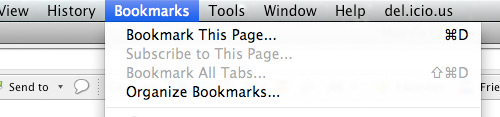
Look for Bookmarks on the top navigation. Select Organize Bookmarks…

Step 2

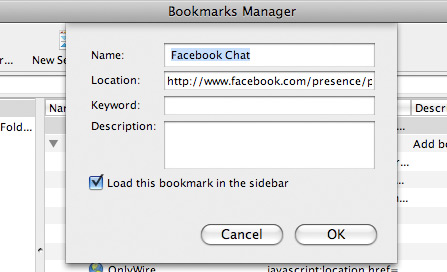
Click New Bookmark... tab and enter the following:

  • Name: Facebook Chat
  • Location: http://www.facebook.com/presence/popout.php
  • Check Load this bookmark in sidebar.

fchat02.jpg

Step 3

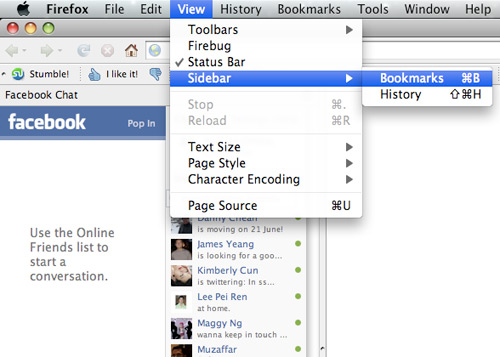
Launch the Firefox sidebar, click Facebook Chat and start chatting with your Facebook contacts within Firefox.
fchat03.jpg
facebook chat

May 7, 2010 Ritesh Sanap Facebook, Firefox

FoxTab – 3d exprience while browsing

FoxTab is an every good addon for firefox with its help you can explore your browsing in a 3d manure. An absolute Excellence addon for firefox which might be difficult to get.Quickly access your chosen top sites, reopen a recently closed tab, or flip between the currently opened tabs.To better distinguish between the various views, you can set a different layout and theme for each one of them.From the options panel, you can also set the Top Sites view as the default new tab page.

Main Features :

  • Visual access to your favorite top sites.
  • Reopen a recently closed tab.
  • Flip between currently opened tabs.
  • 6 layouts to choose from.
  • For each layout, select the perspective that you find the most fun and useful to use.
  • Customize the way FoxTab looks with a set of predefined themes or by creating your own customized theme.
  • Display thumbnails in Landscape and Portrait orientation.
  • Launch FoxTab with your keyboard or mouse.

Beauty at your fingertips
It’s about time to throw some colors into your FoxTab. Select a predefined Theme or customize one of your own.

3D Perspecitve
3D Perspective brings the vivaciousness element to FoxTab. There’s never been a better and more visually stunning way to flip between tabs and windows.

Screenshots :

Download : Click Here

After downloading refer to this page for how to easily use it : Click Here

April 22, 2010 Ritesh Sanap Firefox Firefox Addons

Set More Than One Firefox Homepage

For those Firefox advocates including me myself, I relish the thought of knowing another simple trick about the ever powerful Firefox itself that will enhance my web experience. A little unknown feature available in your latest version of Firefox 3 is that is allows you to set more than on homepage. What i mean is that you can now open several instances of Firefox homepage when you first execute and run the popular web browser.

Select and follow the following directions on how to set and run more than one homepage in Firefox.

Tools -> Options -> Main (Home Page)

After which, simply separate each desired homepage with “|”. For example assuming you would like to make Facebook and Google to start up together when your launch Firefox, it should reflect as follows:

Well so what do you think of this simple trick that you’ve just learnt? Not too tough huh?

March 28, 2009 Ritesh Sanap Firefox, Internet, Solutions Cool things, Hacks, Software

Make Firefox Work Faster Than Ever

1. Enter the Configuration panel of firefox by about:config in address-bar .

2. Search and Set
browser.cache.disk.capacity to 3/4 th of existing value.

3.Search and set
browser.cache.memory.capacity to 3/4 th of existing value.

4. Restart your firefox browse internet with FastestFox Addone

February 29, 2008 Ritesh Sanap Firefox

Make Mozilla Run At Blazing Speed

These are few steps to make your firefox run at lightining speed

1. first in the URL bar, Type “about:config”. This will bring up a list of commands and variables you can edit.
2. The second step is to put “network.http.pipelining” in the filter and change the value to “true”.
3. After that you will want to put “network.http.proxy.pipelining” in the filter.
Like the last one, make that value set to “true” also.
4. Next, locate “network.http.pipelining.maxrequests” and change the value to some number higher, say 10,20 or even 30, it would make up to 10,20 or 30 requests at once.
5. The last step is to right click anywhere and select “New” then “Integer”. Name it “nglayout.initialpaint.delay” and make its value “0?. This will make the browser respond faster on the information of the websites it receives.
6. Close out FireFox (make sure FireFox is closed by viewing the Task Manager) and restart it and enjoy the new mega speed.

December 17, 2007 Ritesh Sanap Firefox, Internet

Posts pagination

Previous page Page 1 Page 2

Currently Trending

  • How to download Specific parts of YouTube videos
    How to download Specific parts of YouTube videos
  • Windows Vista CD key
    Windows Vista CD key
  • How to retrieve my Demonoid username
    How to retrieve my Demonoid username
  • How to add Logo to Thesis theme
    How to add Logo to Thesis theme
  • How to Delete Feedbacks from JetPack Contact Form
    How to Delete Feedbacks from JetPack Contact Form
  • List Of All 255 Keyboard All Alt Key Codes
    List Of All 255 Keyboard All Alt Key Codes
  • h4x0r ( Hacker ) - Blogger Template
    h4x0r ( Hacker ) - Blogger Template

Get Latest post in your Inbox

Random Posts

100+ Best Online Games – Who Else Wants to Play ?

July 27, 2008 By Ritesh Sanap 1 Comment

Stardust – Blogger Template

May 22, 2010 By Ritesh Sanap 2 Comments

How to automatically email contributors when theirs post is published

January 23, 2012 By Ritesh Sanap Leave a Comment

Pac Man Permanent on Google

May 24, 2010 By Ritesh Sanap Leave a Comment

How to Copy files from Google Drive to DropBox or Box.net – Mover.io

December 24, 2013 By Ritesh Sanap 1 Comment

WordPress

HTTP2 Server Push for W3 Total Cache Minify plugin

August 17, 2016 By Ritesh Sanap 5 Comments

How to Disable Emojis in WordPress

January 6, 2016 By Ritesh Sanap Leave a Comment

JetPack Related posts and Sharing not working with NGINX

November 10, 2015 By Ritesh Sanap Leave a Comment

Simply Pure – WordPress Theme

November 2, 2014 By Ritesh Sanap 2 Comments

Advanced What should we Write about next? – WordPress Plugin

July 28, 2014 By Ritesh Sanap Leave a Comment

How to Disable Self Pingback or TrackBack

January 16, 2014 By Ritesh Sanap Leave a Comment

BlueStrap – WordPress Theme

January 1, 2014 By Ritesh Sanap 15 Comments

How to Create Multiple Excerpts in WordPress

December 24, 2013 By Ritesh Sanap Leave a Comment

How to Disable Auto Update in WordPress

November 21, 2013 By Ritesh Sanap Leave a Comment

How to Delete Feedbacks from JetPack Contact Form

November 19, 2013 By Ritesh Sanap 9 Comments

Recent Posts

  • HTTP2 Server Push for W3 Total Cache Minify plugin
  • How to show hidden files and folders in Mac OS X
  • How to Disable Emojis in WordPress
  • Canva – Online Photo Editor
  • JetPack Related posts and Sharing not working with NGINX

Archives

Recommends

  • DigitalOcean – Cloud Hosting
  • Dropbox – Cloud Storage
  • Elegant Themes – WordPress Themes
  • LastPass – Password Manager
  • Like us on Facebook
  • Follow on Twitter
  • +1 on Google
  • Subscribe via Email
  • RSS Feed

© 2026 Best 2 Know · All Rights Reserved · We ♥ DigitalOcean