
 I guess you might have know that adsense has changed their Interface in March 2010, that you have already saw in may post “How to Request for Invitation to New Adsense Beta Interface” So Just few Minutes ago i have received at excerpt from google’s Adsense Team that they have Tweak their interface and made many changes and they are removing Site reports from it as it is having some errors
Archive: October 2010
Archives for October 2010
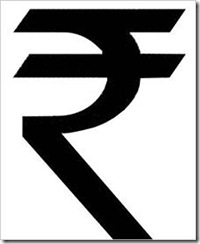
Installing Indian Rupee Symbol
I know its quit late to tell you about this but still many people don’t know about this About “Installing Indian Rupee Symbol” . As our older keyboard supports signs like Dollar ( $ ) , Euro ( € ) , Pound ( £ ) , Yen ( ¥ ) and many more. but it will take some time including it in the day to day life and computers , So Mangalore’s Foradian Technologies they made an Rupee font . This Font is true type font and is unicode that is accepted very were so its easy but one problem that the font is need to be installed in your PC or in the PC were the other person will be watching
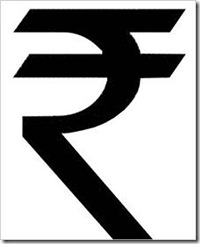
Preview of Indian Rupee Symbol :
If you haven’t seen it yet then here’s a preview. but i guess that you would have seen it surely because its India’s Pride
 Now lets Get back to Installing it :
- First we have to download the font , so to download it visit : Foradian’s Technologies Blog
- If you are using Windows Vista or Windows 7 then Just right click the font and click on Install font :D
- If you are using windows XP or Older version then Follow this steps :
- Extract the Font
- Then Copy the Font to Fonts Folder
- The fonts Folder is Located in Control Panel and then click on Fonts
if you are still not able to understand to make you understand i found out a video from youtube that will help you
We are back !
 I m feeling really nice about writing this that we are back ! its been a month that i was fighting to get back our best2know.info and at last i succeed. the journey to this end was very bad and i wish no one in the world should go from that pace. because i was losing hope and was trying to forget but my will power don’t let me did it :D