August 2009

GTalk Tips and Tricks / ShortcutsI think many of the user an visitor of my site might be knowing the google messenger which is called  GTalk (Google Talk) officially released by google . it good simple and lighter it is just about 1 or 2 MB but it is great i too use it and it is too simple to use but today i will make it more simple to you to use by giving some shortcuts.

Dont have GTalk Click Here to Download.

Here are some Keyboard Shorcuts :


CTRL + Mousewheel up/down: Change the font size in a conversation window.
CTRL + E: Center text
CTRL + R: Right justify text
CTRL + L or CTRL+J: Left justify text
F9: Open Gmail to send an email to the person you talk to
F11: Start a call
F12: Stop the current call
ESC: Close the current window
Tab – Switches to next opened gtalk window. (same effect with Ctrl+tab and Shift+tab)
Shift + Tab – The same thing does that Tab but in reverse.
Ctrl + Shift + L – Switch between points, numbers, letters, capital letters, roman numbers and capital roman numbers

Bold Text : Use asterix before and after the text to make it bold. Like *hello* will make it hello.

Italic Text
: Use underscores before and after the text to make it italic. Like _hello_ will make it hello.

Want to leave blank message
: Just Press Shift + Enter together and meassage box will become big then leave shift and Just press Enter and the blank message will be received by your friend.

Hi again i m gonna give you something which is only for windows vista users many of you dont like to buy an original copy windows then this is the best way to get you activated your windows but i want to tell every user that dont support piracy instead of that buy that product because the product bought pirated are some time fake and sometime they dont work . i too love games so buy them original . this is my opinion that you dont support piracy but as you are in difficulty i m always to support you so today i m going to release some of the vista keys that i have received when i bought and some are given by friends so i would like if you thank them too.

Here are the Keys:

S/N: 11897-OEM-0021902-19210


S/N: YFKBB-PQJJV-G996G-VWGXY-2V3X8 oder VMCB9-FDRV6-6CDQM-RV23K-RP8F7 Name: cd key S/N: 8rs83438dg8a83vcshsj


Name: silverio S/N: YFKBB-PQJJV-G996G-VWGXY-2V3X8 ESSE SERIAL NAO FUNCIONA


S/N: 7W3KH-TG8DP-W78W8-KMV8C-DV9J7


Name: Serial S/N: YFKBB-PQJJV-G996G-VWGXY-2V3X8


S/N: yfkbbpqjjvvwgxy2v3x8


S/N: VMCB9-FDRV6-6CDQM-RV23K-RP8F7


S/N: V4TYH-74MWQ-6VTBQ-XRD3V-9MMX2


Name: Serial S/N: YFKBB-PQJJV-G996G-VWGXY-2V3X8


S/N: VMCB9-FDRV6-6CDQM-RV23K-RP8F7


Name: cd key S/N: 8rs83438dg8a83vcshsj


S/N: YFKBB-PQJJV-G996G-VWGXY-2V3X8


S/N: 7W3KH-TG8DP-W78W8-KMV8C-DV9J7


Name: Serial S/N: YFKBB-PQJJV-G996G-VWGXY-2V3X8


S/N: yfkbbpqjjvvwgxy2v3x8


S/N: YFKBB-PQJJV-G996G-VWGXY-2V3X8 This serial will work with any version of Windows Vista released before 9/1 07. Work with Beta, RC 1, 2 and RTM, Final


S/N: TCP8W-T8PQJ-WWRRH-QH76C-99FBW S/N: PVYFQ-2JTBV-9KXQ2-FQHDY-MTBVH


S/N: 722X2-M2J8D-29KX4-RXFFQ-QWHFD Business version-English Upgrade only


Name: cd key S/N: 8rs83438dg8a83vcshsj


S/N: 9bbvt-rr6m6-mrxd3-4j97f-rcgfq


S/N: 7W3KH-TG8DP-W78W8-KMV8C-DV9J7


Name: Serial S/N: YFKBB-PQJJV-G996G-VWGXY-2V3X8


S/N: yfkbbpqjjvvwgxy2v3x8


S/N: 7x9r6-99427-v6dyq-yj493-wpcgf

This is the real Product Key not a fake one at all if it does not work don't think its a bad one its a good one just call Microsoft and tell them its not working thats means to many people have used this code ok email me if you need help.

Chucky   Blogger Template

Hello again Today i m gonna give you my another blogger template. its name is Chucky . I know it sounds good but it looks good then its sounds.ya its complete looks like an premium but I would I like to give it for free to all my blog visitors and readers. I think many of my visitor might know that very time most of the i release the template which is widgetize. so don't think that you have to do many things to use this template. 
Screenshot :

Chucky   Blogger Template
Now After you Upload template you can start Using it.
Using Featured Content :

1. When you see the Featured Content beside it click on Edit link.
2. Then Add the Following Content :

<div id="featured-post-wrap" class="clearfix">
<script type="text/javascript">
jQuery(document).ready(function() {
jQuery('#featured-post').cycle({
fx: 'fade',
speed: 'fast',
timeout: 6000,
pause:2,
next: '#featured-next',
prev: '#featured-prev'
});
})
</script>
<div id="featured-post">
<div class="featured-item">
<img alt="Image Name" width="304" src="Link of the Image" class="featured-thumb" height="190"/>
<div class="post clearfix">
<p class="date-post">Date of the Post </p>
<h2 class="title"><a href="Link of the Post" title="Title of the post">Title of the post.</a></h2>
<div class="entry">

Post Content Or Description

</div>
<a class="read-more" href="Link of the Post" title="Continue Reading...">Continue Reading...</a>
</div>
</div>
</div><!-- /featured-post -->
<a id="featured-prev">prev</a>
<a id="featured-next">next</a>
</div><!-- /featured-post-wrap -->

3. You have to just change the things highlighted in red color.
4. If you want to add more post then Just before

</div><!-- /featured-post -->

 add this code :

<div class="featured-item">
<img alt="Image Name" width="304" src="Link of the Image" class="featured-thumb" height="190"/>
<div class="post clearfix">
<p class="date-post">Date of the Post </p>
<h2 class="title"><a href="Link of the Post" title="Title of the post">Title of the post.</a></h2>
<div class="entry">
Post Content Or Description

</div>
<a class="read-more" href="Link of the Post" title="Continue Reading...">Continue Reading...</a>
</div>
</div>

5. Repeat The step and Get as much post you want.
6. Wishing more steps sorry but this much only now Just save it.

Make Money Using Twitter !IT would be so cool to earn an money with your twitter account don't you think like that . So today i have brought to you which every one likes the most in the World money without any problem. ya its true so i think i should tell you what it is. RevTwt is an site which will pay you just for your tweets isn't it cool ? Get ready to get some Extra earning.


Screenshot:

Make Money Using Twitter !

To start with RevTwt , you need a Twitter account and RevTwt account. You need at least 50 followers on Twitter to start the service.Just follow people and they will follow you back as a courtesy or check my earlier post on How to increase twitter followers ! 

Make Money Using Twitter !

How to earn from RevTwt ?

1.Referrals
The RevTwt referral program is a great way to spread the word of this great service and to earn even more money with your Twitter account! Refer friends and receive 20% of their earnings for life! Sign up here 
2.Ad clicks.

Referrals you just tweet out the url,Ad clicks you get to chose companies that pay so much per click.This is my referral link : RevTwt There is a minimum of $ 20 to request the payment and you can receive the money through your PayPal account.

If don't Have Paypal Account you can get one to get Click Here
 

Want an RevTwt Account Click Here

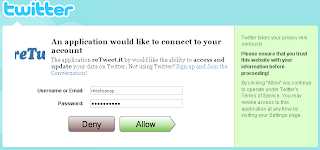
Hi again to all of you today i m going to tell you how to get more retweets. retweets are very useful get the hoards of traffic more attention of the people to the content you have published many of users are new to the twitter they try to use some widget or stuff to do that but they dont know is that good or really working so. reTweet.it is an trusted site which i too use you can use it to get more retweets.

Lets Start Up !
1. Goto reTweet.it
2. Then Click on  How to Get more Retweets
3. Then you have enter your twitter account details
   Preview :

How to Get more Retweets

4. Click on How to Get more Retweets
5. You are Done Now !


You will first have 3 credits in your account as you do the retweets of other you will get 0.5 credit per retweet and  if you want to get you text tweeted then you have to assign 1 credit per tweet.

How to create a blogger blogToday I m going to tell you how to create a blogger blog. Blogger blogs are really good and Easy to use every beginner can understand to use it.

1. Visit Blogger.com
2. If you have gmail or google account use it.

3. Then Fill your email address and Password of it (Google or Gmail account details)
Preview :
How to create a blogger blog

4. Then Fill The Details such as Display name and Etc.
Preview :
How to create a blogger blog

5. Then Click On
How to create a blogger blog

6. Then Fill Details like Blog Title and Link of blog.
Preview :
How to create a blogger blog
7.  The Last and Final Step To Choose an Template and Click on
How to create a blogger blog

Blog Design Series

by Ritesh Sanap on August 8, 2009

Blog Design Series

All of my visitors today i going to announce that i m thing to start an blog design series in which you all will learn every single part and code of the blogger code I tell you how to modify it every single part of it. how i design them some easy to convert tricks and many more i will only start it if i get more response about it. every possible and every little stuff .