Best 2 Know

The Ultimate Blogging Resource

  • Advertising
  • WebHosting
  • Contact Us
  • Blogger
    • Blogger Templates
    • Blogger Tutorials
  • Browser
    • Firefox
    • Google Chrome
  • Google
  • Internet
    • Facebook
    • Twitter
  • Thesis
  • Windows
  • WordPress
    • WordPress Themes
    • WordPress Plugins
  • More
    • Linux
    • Review
    • Solutions
    • Announcements

Archive: July 2009

Archives for July 2009

How to increase twitter followers !

Many of you have twitter account and as it is one of most popular site on the net many twitter user want more followers for them.  How to increase Twitter Followers ? they used it for diverting traffic to their site. now today I am going to tell you an site which will boost your twitter followers. I tried it and work within a day so i think you to try. Twittbank is the site which offers you more followers.

Now lets Get Started to increase Followers :
1. First visit Twittbank.
2. Enter your twitter user id and password.
3. Click on Let’s get started
4. In the Column Looking for people talking about put the Keywords and click on submit.
5.  Then in These people should be from Put the from which place would the users from or leave it default.
6. Then scroll little down and Click on I am Happy, bye !

July 20, 2009 Ritesh Sanap Twitter Cool things, Followers, Let, traffic, Twittbank

Excellence Blogger Template

Hi to all of my Readers today i m introducing again an blogger template created by me. i think you should use this template because it is completely replica on the WordPress version.

Some new Features :

1. WordPress Comment Link To Show No Comments
Preview :

2. New Style Posted Area
Preview :

3. No Response Comment style
Preview :

4. Response Comment Style
Preview :

Page Layout is purely clean 
Preview :


Download | Live Preview

After Uploading the Template :

1. Changing Search Field 
1. Find this <form action=’/search’ method=’get’>
2. Before /search add your Blog’s link. For E.g.: yourname.blogspot.com/search

2. Changing RSS Link
1. Find this <a class=’rss’ href=’http://riteshsanap4u.blogspot.com/’>
2. Replace http://riteshsanap4u.blogspot.com/ With Your Feed Link or Feedburner ID


3. Changing Recent Section
1. In page Layout Click on Edit link in front of recent section.
2. Find this <script src=”http://riteshsanap4u.blogspot.com/feeds/posts/default?orderby=published&amp;alt=json-in-script&amp;callback=rp”></script> replace it with your blog link in
<script src=”http://riteshsanap4u.blogspot.com/feeds/posts/default?orderby=published&amp;alt=json-in-script&amp;callback=rp”></script> This will change your Recent Post section.
3. To change Recent Comments Section just go little down you will find the same type of script in that also change.

4. Just Save .

July 12, 2009 Ritesh Sanap Blogger Templates

How to create transparent png with photoshop

Hi friends today i m going to tell you how to make transparent png image using photoshop. ya its really to easy.

1. Open Photoshop and open the image you want to make transparent.
2. In layers the click on the lock icon
preview:

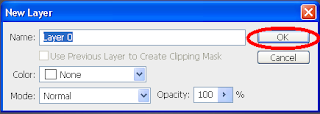
3. An new Dialogue Box will open click OK on it.
preview:

4. Click on Magic wand tool ““
5. Using magic wand tool click on the field which you want not to display.
preview:

6. Then just Click Delete Key of the Keyboard.
7. Then what will you get will be like this in checked background.
preveiw:

8. I think now You know what i want to say is if you are happy save it .

July 11, 2009 Ritesh Sanap Solutions, Windows Cool things, Tutorials

BizFresh Blogger Template – Free Blogger Template

Hi Friends today i am again going to give an blogger template Named Bizfresh it is very good template widgetize and a proper layout this template is just like Plug and play feature means just upload and use no need to edit it

For live Preview : Click Here
To Download     : Click Here

After You Install the template please preview it then save it.

To activate Calender widget which in near post title Follow this steps :
1. Login to your blogger account

2. At Dashboard, choose tab Settings

3. At Setting tab, choose tab Formatting

4. At Formatting tab, change Timestamp Format to format like “Tuesday, May 5,2008”.

Remember change the TIMESTAMP, not DATE HEADER

5. Click button Save Settings and DONE.

July 11, 2009 Ritesh Sanap Blogger Templates

Currently Trending

  • How to download Specific parts of YouTube videos
    How to download Specific parts of YouTube videos
  • Windows Vista CD key
    Windows Vista CD key
  • How to retrieve my Demonoid username
    How to retrieve my Demonoid username
  • How to add Logo to Thesis theme
    How to add Logo to Thesis theme
  • How to Delete Feedbacks from JetPack Contact Form
    How to Delete Feedbacks from JetPack Contact Form
  • List Of All 255 Keyboard All Alt Key Codes
    List Of All 255 Keyboard All Alt Key Codes
  • h4x0r ( Hacker ) - Blogger Template
    h4x0r ( Hacker ) - Blogger Template

Get Latest post in your Inbox

Random Posts

A Great Magic Trick With Google – Fool your Friends

July 21, 2008 By Ritesh Sanap 1 Comment

How To Make Your Own Windows Media Player Theme

March 8, 2009 By Ritesh Sanap 1 Comment

20 Ways to Make Money Online – eBook

August 10, 2008 By Ritesh Sanap Leave a Comment

How to add Custom Favicon to blogger blog

June 17, 2010 By Ritesh Sanap 4 Comments

SkipScreen:Download From Rapid Share,Mega upload,Media Fire or Any Hosting SiteWith Out Waiting For Seconds (Download In Single Click)

May 16, 2010 By Ritesh Sanap Leave a Comment

WordPress

HTTP2 Server Push for W3 Total Cache Minify plugin

August 17, 2016 By Ritesh Sanap 5 Comments

How to Disable Emojis in WordPress

January 6, 2016 By Ritesh Sanap Leave a Comment

JetPack Related posts and Sharing not working with NGINX

November 10, 2015 By Ritesh Sanap Leave a Comment

Simply Pure – WordPress Theme

November 2, 2014 By Ritesh Sanap 2 Comments

Advanced What should we Write about next? – WordPress Plugin

July 28, 2014 By Ritesh Sanap Leave a Comment

How to Disable Self Pingback or TrackBack

January 16, 2014 By Ritesh Sanap Leave a Comment

BlueStrap – WordPress Theme

January 1, 2014 By Ritesh Sanap 15 Comments

How to Create Multiple Excerpts in WordPress

December 24, 2013 By Ritesh Sanap Leave a Comment

How to Disable Auto Update in WordPress

November 21, 2013 By Ritesh Sanap Leave a Comment

How to Delete Feedbacks from JetPack Contact Form

November 19, 2013 By Ritesh Sanap 9 Comments

Recent Posts

  • HTTP2 Server Push for W3 Total Cache Minify plugin
  • How to show hidden files and folders in Mac OS X
  • How to Disable Emojis in WordPress
  • Canva – Online Photo Editor
  • JetPack Related posts and Sharing not working with NGINX

Archives

Recommends

  • DigitalOcean – Cloud Hosting
  • Dropbox – Cloud Storage
  • Elegant Themes – WordPress Themes
  • LastPass – Password Manager
  • Like us on Facebook
  • Follow on Twitter
  • +1 on Google
  • Subscribe via Email
  • RSS Feed

© 2026 Best 2 Know · All Rights Reserved · We ♥ DigitalOcean